There can be a few things that might be causing the problem.
METHOD 1:
Material may not be properly installed. Try executing this line of code in the terminal or cmd
ng add @angular/material
METHOD 2:
The second possible cause would be that you haven’t added this module in “app.module.ts” file
For that, add the following lines:
@NgModule({
declarations: [ AppComponent ],
imports: [
BrowserModule,
AppRoutingModule,
MatDialogModule
],
METHOD 3:
Some other dependency is clashing or missing in your angular project. Try running this line in the terminal:
npm i
METHOD 4:
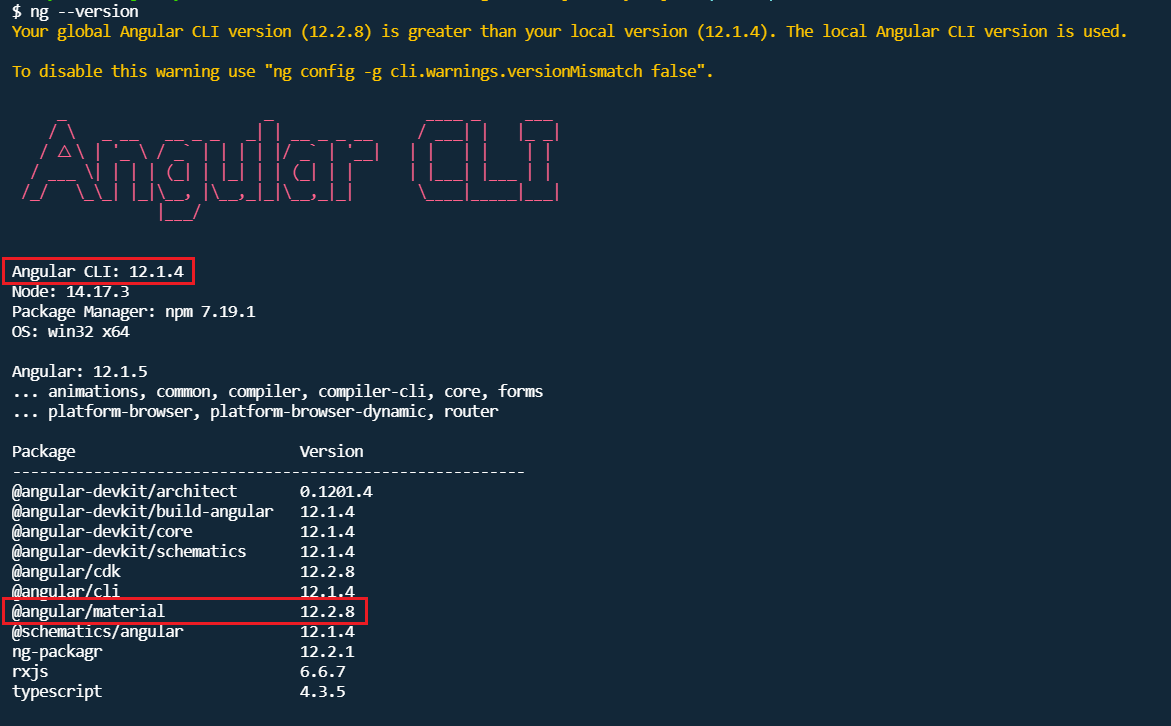
One more thing that could cause the problem, would be that the version of your angular cli and material are not the same. They need to be same. First check the version of both by running the following line:
ng --version
Would give something like this:
They may not need to be the exact same version but in the ballpark. So, in the picture above you can see that both Angular CLI and Material are in version 12.x.x which is good enough. If they are not the same for you, then you could change the material version with the following command.
ng add @angular/material@12
You obviously will replace the ’12’ at the end of the command with the version of the angular CLI that you have installed. And then should do the trick.
That’s all the solutions I have. Hope this resolves your problems. Happy coding!

Recent Posts
Recent Comments
Archives
- October 2025
- August 2025
- June 2025
- October 2024
- September 2024
- August 2024
- June 2023
- May 2023
- March 2023
- December 2022
- November 2022
- October 2022
- September 2022
- August 2022
- July 2022
- June 2022
- May 2022
- April 2022
- February 2022
- January 2022
- December 2021
- November 2021
- October 2021
- September 2021
- August 2021
- July 2021
Categories
- Angular
- AWS
- Backend Development
- Big Data
- Casino
- Cloud
- Database
- Deployment
- DevOps
- Docker
- Frontend Development
- GitHub
- Google Cloud Platform
- Installations
- Java
- JavaScript
- Linux
- MySQL
- Networking
- NodeJS
- Operating System
- Python
- Python Flask
- Report
- Security
- Server
- SpringBoot
- Subdomain
- TypeScript
- Uncategorized
- VSCode
- Webhosting
- WordPress
Search
Recent Post
Lopebet’s Multi-Bet Options: How and When to
- 23 October, 2025
- 2 min read
Understanding Bonuses and Promotions Offered by Tez888
- 30 August, 2025
- 2 min read
Hvordan norske mobilcasino støtter veldedige formål og
- 5 June, 2025
- 2 min read