Hey developers. In this article, we are going to see how to create MySQL in database on AWS cloud. We would also check how to delete a DB instance once you are done with it. Let us see how it is done.
Prerequisites!
- Should already have an AWS account. (Create one here)
Table of Content
- MySql Database Creation: AWS Database
- Delete AWS Database Instance
- FAQ
What is AWS RDS?
Amazon Relational Database Service (RDS) is a service on AWS which provides an easy setup and manage your database on the cloud.
What's MySQL Database?
MySQL is one of the most popular and widely used relational database management systems. It was created by Oracle. It stores large datasets in a structured form. It is managed through SQL (structured query language) to perform transactions.
MySql Database Creation: MySql in AWS
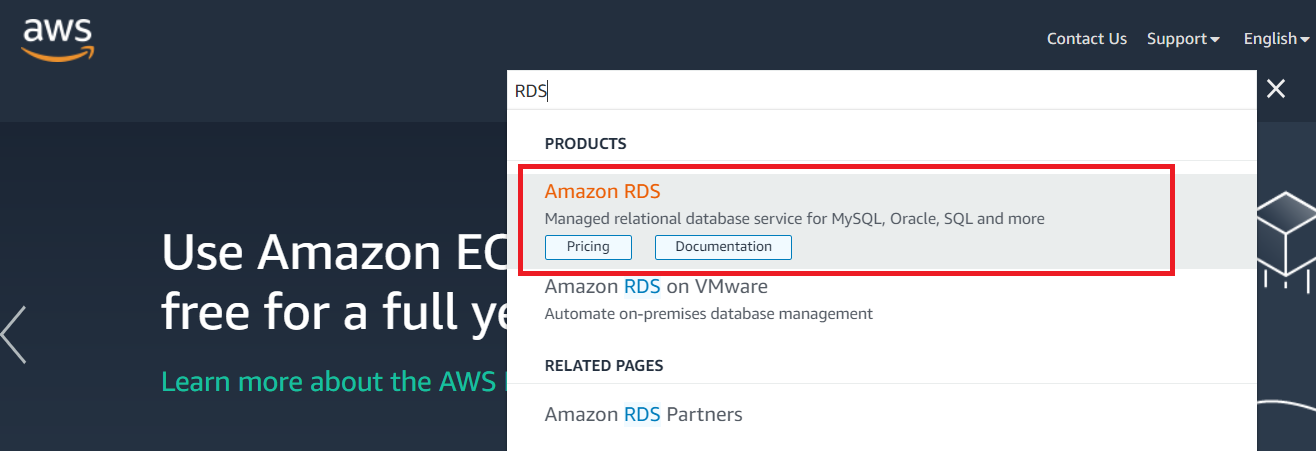
For MySQL database creation on AWS, you need to go on the AWS service called RDS. With AWS RDS free tier, you could use this service for a year. For the long run, check out AWS rds pricing here. Search RDS on the top search bar inside the AWS management console. This will lead you to Amazon RDS Dashboard where you would see an orange-colored button “Create database.” Click on it and you would be led to the configuration page of your AWS database services.
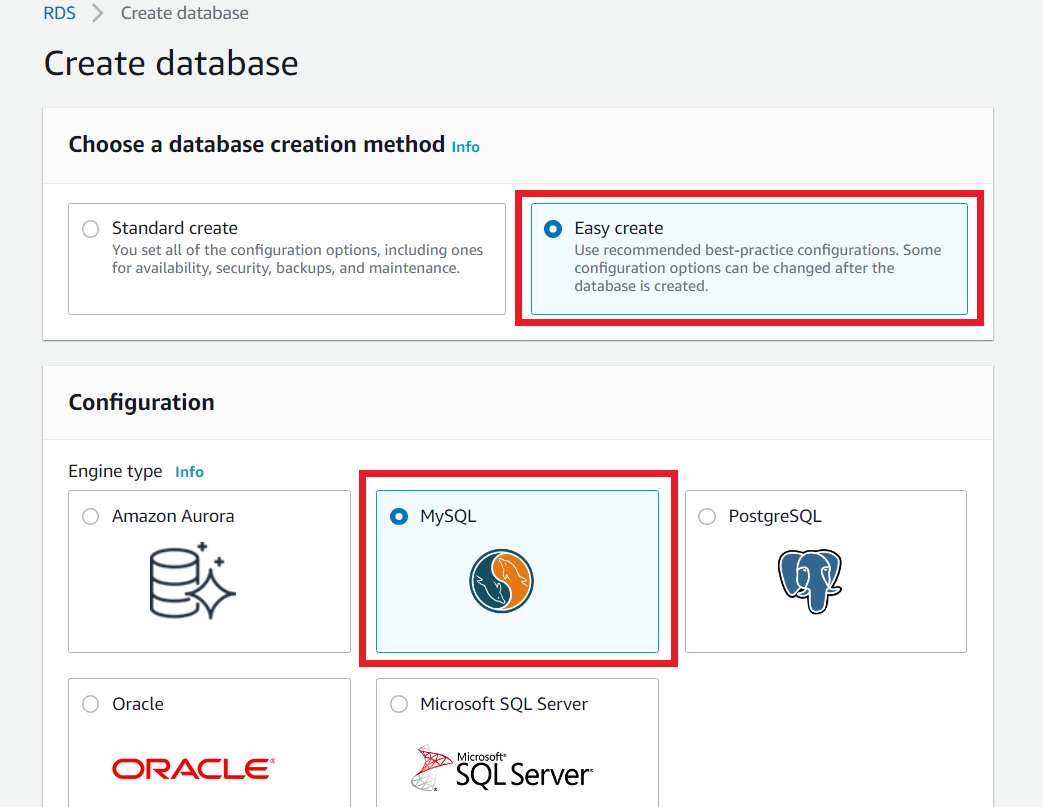
Afterward, you would be shown 2 AWS database options. Select the Easy Create option as shown in the image below. Easy Create has a faster setup process, as it will fill up most of the configurations with default values. Whereas Standard Create would let you configure everything for your AWS Database instance. Such as security, backups, maintenance, etc.
Now, you would be shown multiple AWS RDS instance types. But we are here for MySQL database creation on AWS. A reminder that AWS database services are free only if you are on the AWS RDS free tier. So let’s choose MySQL in database here on the AWS setup page.
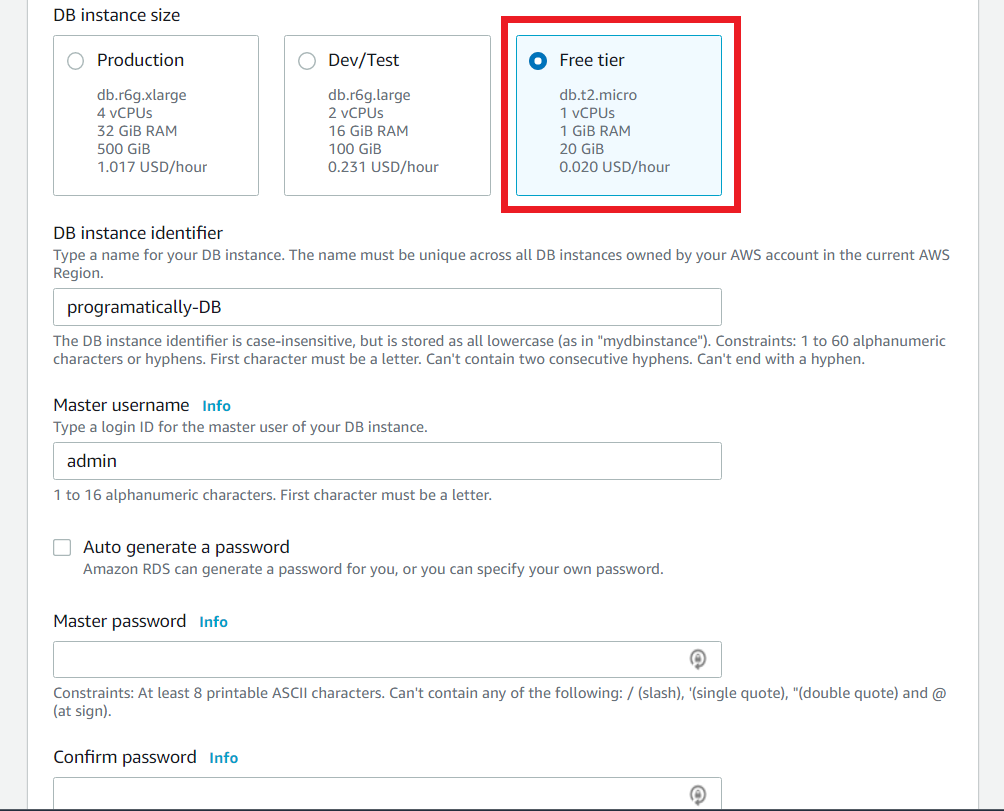
Moving on, you would be shown multiple AWS RDS instance types as seen below. Choose the “Free tier” if you want to use MySQL database free version. This will last for a year but with limited usage. Check AWS MySQL price.
Next, I will give a name to the database instance i.e., ‘programatically-DB’. Then add in your password for accessing the database. And that is all. Click on the Create database button at the bottom of the page and your MySQL database instance would get created.
Check the image below for reference.
Had you selected “Standard Create” instead of “Easy Create”, you would also have to configure AWS RDS proxy, AWS RDS backup, etc.
How to Delete AWS Database
Earlier, we performed MySQL database creation on AWS. Let’s see how we can terminate or delete the MySQL database instance on AWS. This is as simple as it gets.
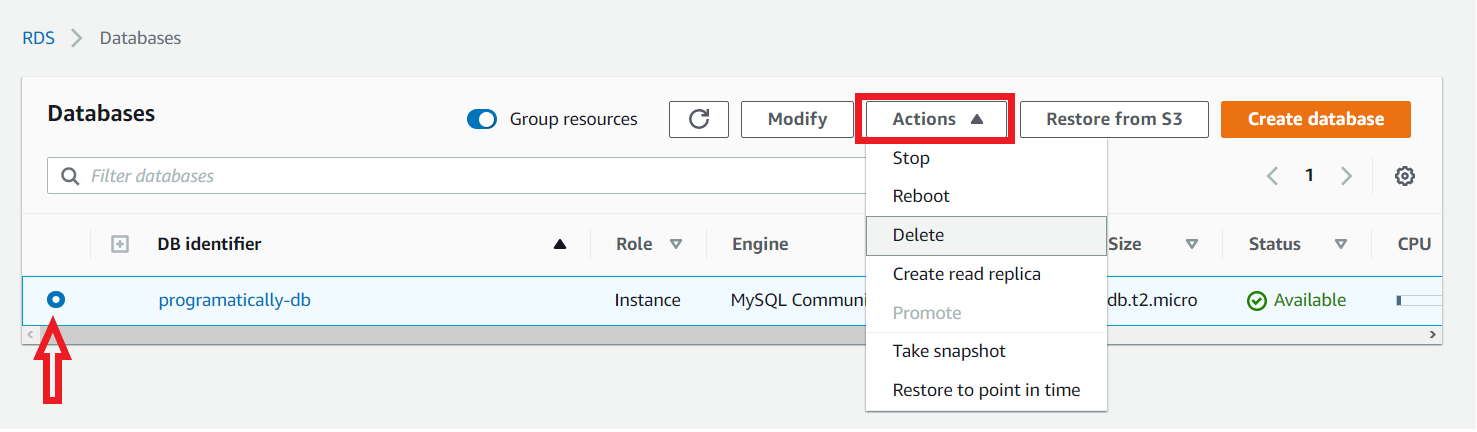
Select the particular instance that you want to delete. Then click on the Actions button at the top and select Delete. That’s it.
In the same way, you can also Stop, Reboot, or Take a snapshot of your AWS database as well. Take reference from the image below:
FAQ
Yes. MySQL in database is free and open-source. However, if we use MySQL for AWS, it is only free for a limited time. You have to pay for AWS database service for long-term usage.
“While S3 is strongly consistent, its consistency is limited to single storage operations. On the other hand, RDS supports transactions that allow one to execute a series of operations while maintaining consistency and even providing an option to roll back the operations in case of the steps go wrong.” (source)

- Aurora scales faster because it can add new read replicas quickly
- Aurora scales further because extra compute nodes are cheap.
- Aurora is more durable. You always have multiple copies of your data.
- Aurora is more resilient. It has a fast recovery from failures.
- RDS supports more database engines and features than Aurora
- You can run an RDS database for a year in the free tier; there’s no free version of Aurora.
- RDS pricing is predictable. It has a fixed per-hour rate. Aurora prices can be unpredictable.
That’s all!
Hope you found the article helpful. I hope now you would have a good idea of how to create MySQL in database on AWS and also manage it. For any queries, leave a comment below.
Have a great one!
Recent Posts
- Zonder Cruks Online Casino Veiligheid en beveiliging van spelers.1175
- Fortune Favors the Bold – Can You Lead Your Clucky Companion Down the Chicken Road & Cash Out Before
- Verfrissend Gokken met nieuwe online casino zonder cruks – Een Nieuwe Ervaring
- Elevate Your Play Find the best australian online casino Experiences with Lucrative Bonuses & Secure
- Lopebet’s Multi-Bet Options: How and When to Use Them
Recent Comments
Archives
- May 2026
- October 2025
- August 2025
- June 2025
- October 2024
- September 2024
- August 2024
- June 2023
- May 2023
- March 2023
- December 2022
- November 2022
- October 2022
- September 2022
- August 2022
- July 2022
- June 2022
- May 2022
- April 2022
- February 2022
- January 2022
- December 2021
- November 2021
- October 2021
- September 2021
- August 2021
- July 2021
Categories
- Angular
- AWS
- Backend Development
- Big Data
- Casino
- Cloud
- Database
- Deployment
- DevOps
- Docker
- Frontend Development
- GitHub
- Google Cloud Platform
- Installations
- Java
- JavaScript
- Linux
- MySQL
- Networking
- News
- NodeJS
- Online casino
- Operating System
- Post
- Python
- Python Flask
- Report
- Security
- Server
- SpringBoot
- Subdomain
- TypeScript
- Uncategorized
- VSCode
- Webhosting
- WordPress
Search
Recent Post
Zonder Cruks Online Casino Veiligheid en beveiliging
- 18 May, 2026
- 5 min read
Fortune Favors the Bold – Can You
- 15 May, 2026
- 6 min read
Verfrissend Gokken met nieuwe online casino zonder
- 14 May, 2026
- 6 min read